Guide
Identify the stars in your photo
Took a photo of the night sky and wonder what is in it? SkySolver tells you: the constellations, the bright stars by name, the nebulae, star clusters and galaxies, and on a photo of the Moon, the craters. It works with photos from phones, cameras and telescopes, takes seconds, and is free.
Step by step
- Open the playground, on a computer or a phone. There is nothing to install and no account.
- Drop your photo onto the page, or press + to choose it. Photos from phones and cameras (JPEG, PNG, TIFF) work, and so do FITS and XISF files from astronomy software. For a photo of the Moon, set the switch at the top to Moon first.
- Wait for Solved. Your browser finds the stars in the photo and the solver matches their pattern against the 13.1 million star patterns of its index: for most photos it takes less than a second.
- Read the sky. The coordinate grid, the constellations and the deep-sky objects are drawn over the photo. Point at any of them, or tap it, for its names, type, size and catalogue numbers. The Objects panel lists everything in the frame.
- Keep it: Save image gives the annotated photo; the Solution panel has the annotation alone (PNG or SVG), the objects in the frame as CSV, and the solution for other astronomy software.
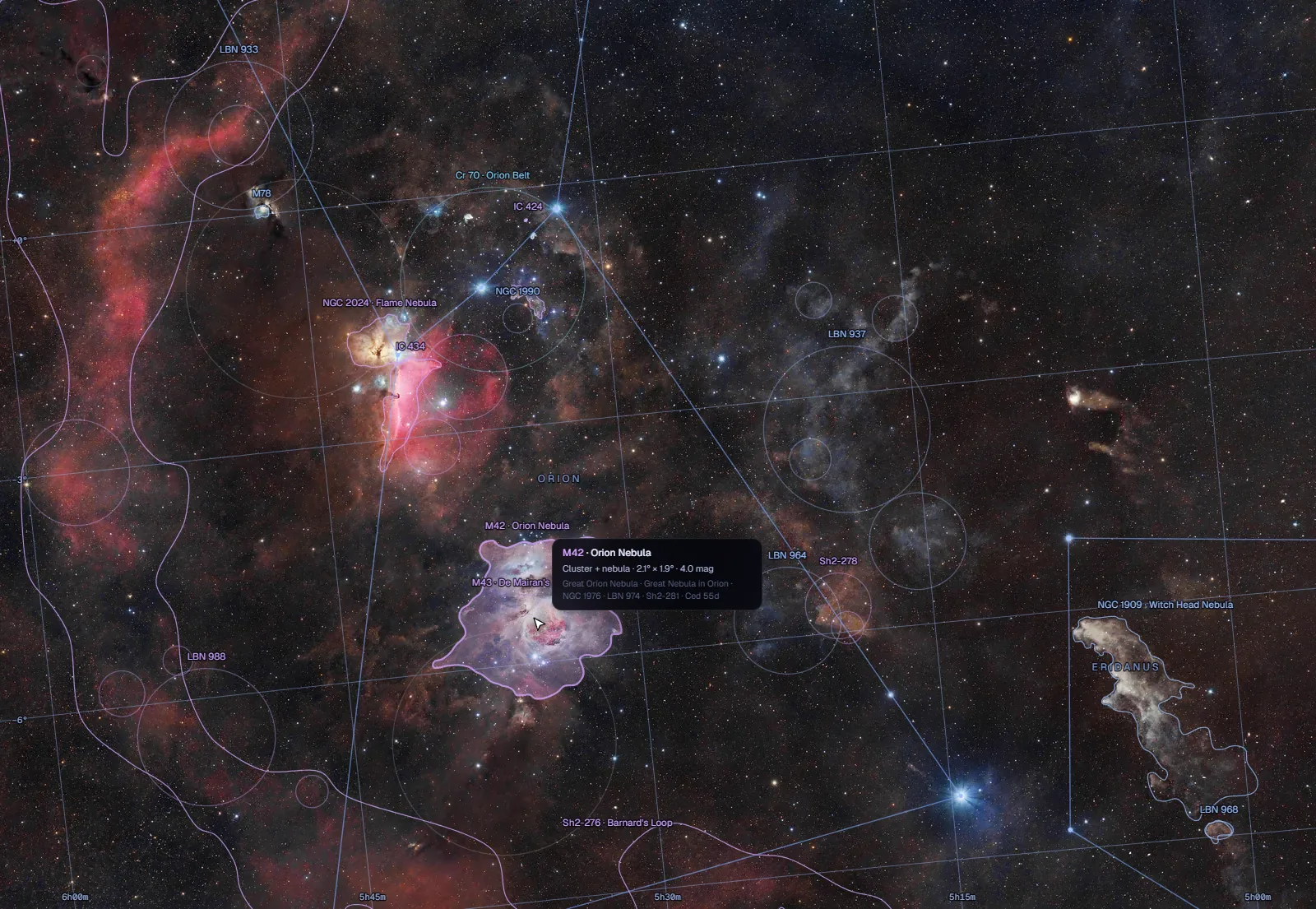
What you will see
- Constellations: the stick figures and names of the 88 constellations, as far as they reach into the frame.
- Deep-sky objects: 20,543 nebulae, star clusters and galaxies from the Messier, NGC, IC and a dozen other catalogues, with the real outlines of the big ones.
- Stars: the named stars, with their proper names and designations.
- Planets, asteroids and comets: placed where they were when the photo was taken, if its file says when (most cameras and phones write the time), or once you enter the time.
- On the Moon: the maria, craters, mountains and rilles by name (6,971 of them on the near side), the terminator, and the relief of the ground.
Phone, camera or telescope
- Phones: night-mode photos with a few dozen stars or more work well; a short snapshot of a bright city sky may hold too few stars.
- Cameras: any lens, from fisheye to telephoto, with landscape, trees or water in the frame. Stitched panoramas up to the whole sky solve too, in seconds.
- Telescopes: fields down to about 0.3° across, and to 0.1° around small galaxies, planetary nebulae and globular clusters. The solution goes into a FITS WCS header for your processing software.
If it does not solve
- Use the original file, not a screenshot or a copy shrunk by a messaging app: small, heavily compressed copies lose the faint stars.
- Heavy noise reduction or a strong star-shrinking edit can erase the stars the solver needs; try an earlier version of the image.
- Short star trails are fine; long trails from a fixed camera make the stars hard to measure.
- For the Moon, check that the switch is on Moon. Close-ups solve reliably down to a region about 250 km across; a single crater filling the frame solves only sometimes, so include some of its surroundings. The thinnest crescents without earthshine, and very blurred photos, can still fail.
If a photo with plenty of stars does not solve, write to [email protected]: failures are how the solver gets better.
Does my photo leave my device?
A photo of the stars does not: your browser finds the stars itself and sends only their positions. A Moon photo is solved from a greyscale copy, at most 2048 pixels across, which the solver forgets once it has answered. Nothing is stored or logged; see privacy.